The gate kiosk
Open full screen on a gate card gives that gate its own display — dark, high-contrast, readable across a gatehouse. It carries the same Simulated feed banner, and for the same reason.
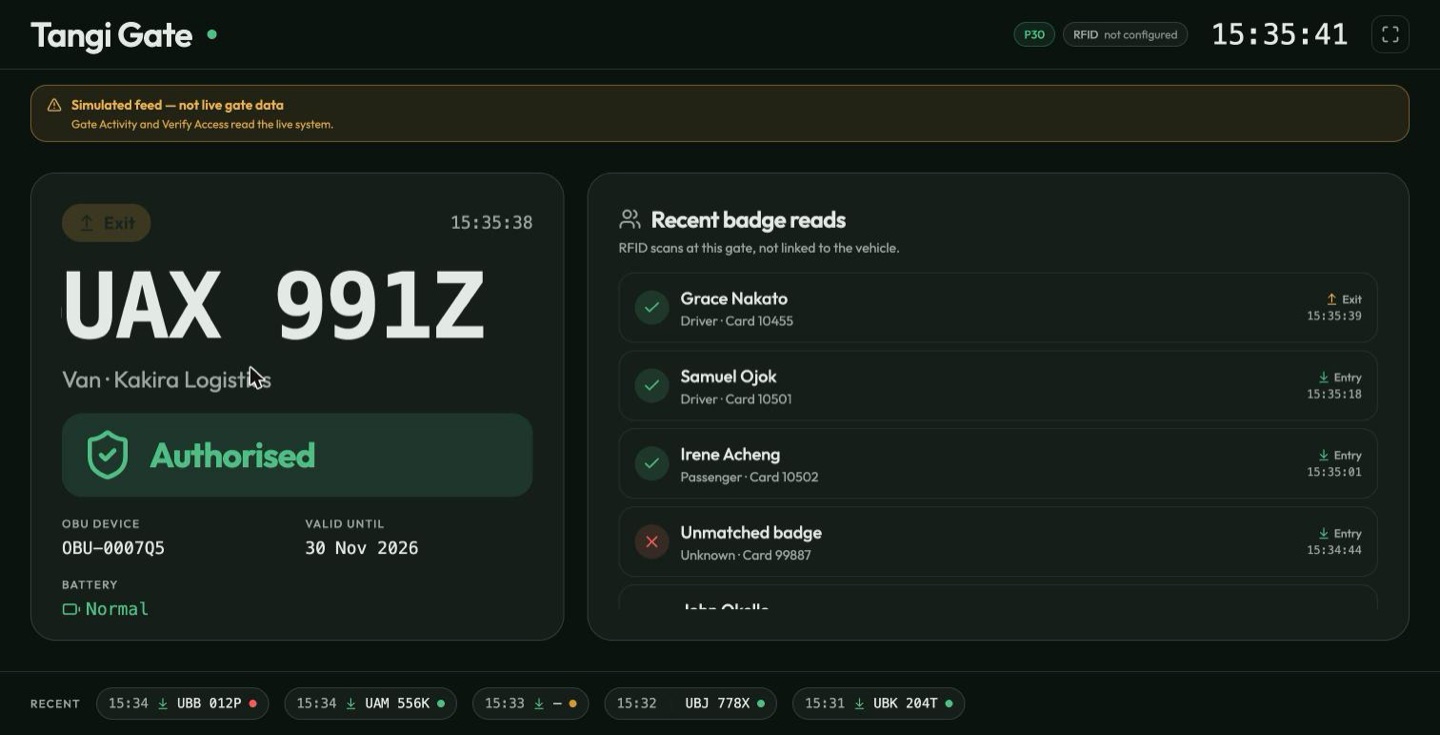
The left panel is the vehicle on the current crossing: direction, plate, the verdict, and the OBU's device id, validity and battery. The right panel is Recent badge reads — the RFID scans at this gate, newest first.
headed "RFID scans at this gate, not linked to the vehicle." Nothing ties a badge read on this display to a particular crossing, so this is not the manifest of who is aboard the vehicle on the left. Read them as two streams at the same barrier.
The assigned occupants roster on the Gate Monitor card (Assigned occupants) is the one that does compare the two — it is a different panel on a different screen.
Two states to recognise:
- Unregistered vehicle · Check · No OBU detected — a vehicle arrived with no transponder the reader could see. Either it has never been fitted with one (Assigning an OBU), or the unit has failed. Handle it at the window and log an OBU incident.
- Unmatched badge · Unknown · Card 77120 — a card was read that TPAS cannot tie to a person. It may be lost, revoked, or belong to another site.
Along the bottom, the last few crossings as coloured chips — green authorised, red denied — so you can see at a glance whether the last minute went smoothly.
This is a display, not a control. Nothing on it opens a barrier.