Registry
The registry is the record of who and what is allowed into the park. Nothing crosses a gate that does not exist here first.
There are two parallel journeys, and they meet at the gate:
PEOPLE                                  VEHICLES
  Master list         (who a           Register vehicle    (the plate exists)
       │               contractor           │
       │               vouches for,         │
       │               approved by TE)      │
  Access request      (asking for      Assign OBU          (a device is
       │               access)              │               reserved for it)
  Review & approve    (TotalEnergies   Fit OBU             (an installer
       │               decides)             │               bolts it on and
  Person record       (they exist)          │               photographs the plate)
       │                                    │
  Issue badge         (a card in       Vehicle active      (the barrier opens)
       │               their hand)
  Dispatch & confirm  (they sign for it — Device stock)
Management → People Management and Management → Vehicles Management; contractors find the same pages flat under Registry. Both are named where it matters below.
Every registry list heads each row with a small picture: a vehicle on the vehicle lists, a figure on the people lists. It is not decoration. The picture is painted in one of three colours, and the colour is the whole message:
| Colour | Meaning |
|---|---|
| 🟢 Green | The subject has what it was waiting for. Nothing is owed to it. |
| ⚪ Grey | Still waiting — and that is still reasonable. Or the subject is out of play (suspended, retired, withdrawn, not yet submitted), so nothing is owed to it and it will never turn red. |
| 🔴 Red | The wait has dragged on past the limit. Somebody needs to act. |
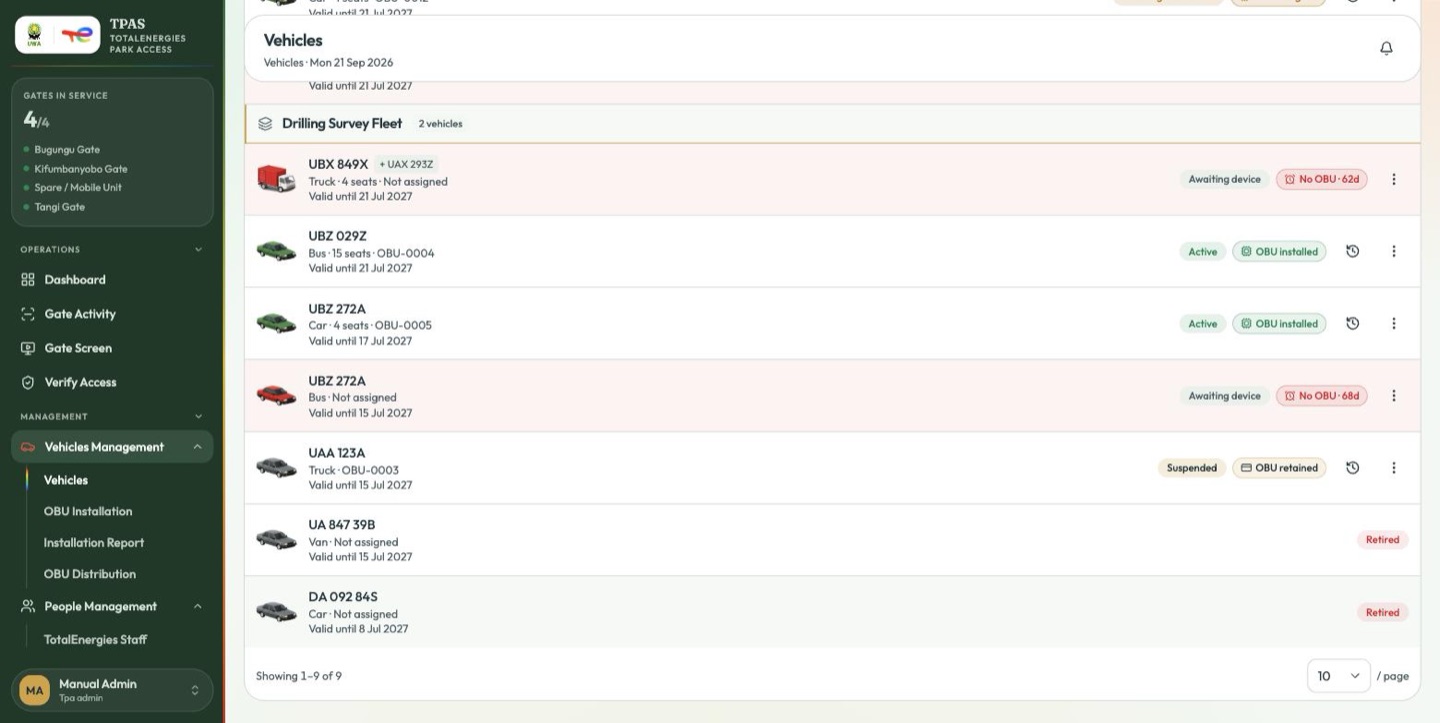
Every state in one frame, top to bottom: a red truck 38 days without an OBU, two green vehicles carrying one, another red at 43 days, and three grey ones that are suspended or retired and so are owed nothing.
The limit is 14 days. A subject that has been on the register for fourteen whole days or more without receiving what it is waiting for turns red.
A red subject also gets a red row tint and a red flag naming the wait, so the colour explains itself rather than leaving you to guess:
- Vehicles: No OBU · 21d
- People: No badge · 17d
Hover either flag for the full sentence — "Registered 21 days ago and still has no OBU assigned — past the 14-day limit."
What each list is waiting for
| List | Green means | Grey means | Red means |
|---|---|---|---|
| Vehicles (Vehicles) | An OBU has been assigned to the vehicle | Registered, no OBU yet — or suspended / retired | 14+ days registered with no OBU |
| Personnel & Badges → People (Personnel & badges) | The person holds an RFID badge | Approved, no badge yet — or suspended / inactive | 14+ days on the register with no badge |
| Master list (Master list) | A live name the contractor stands behind | A name awaiting approval, or one taken down | (never — nothing is owed to a master-list entry) |
| Access requests (Access requests) | Approved | Draft, or still reasonably in review | Rejected, or pending 14+ days |
| Visitors (Visitors) | Inside their access window | — | Expired or revoked |
Vehicles get two shapes as well as three colours
The vehicle artwork is drawn as a box truck for heavy plant — anything registered as a Truck or a Bus, or, where no precise type was recorded, anything in the Heavy category — and as a sedan for everything else. The shape is read from what you entered on the registration form (Vehicles), so a vehicle typed wrongly will be drawn wrongly.
Open Vehicles, and every red vehicle is one that has been waiting more than a fortnight for an OBU nobody has assigned. The same scan works on Personnel & Badges → People for badges, and on Access Requests for decisions nobody has made. You do not need a filter or a report to find the backlog — it is the coloured column down the left of the list.
Grey is not a problem; it is work in progress. Red is a promise the park has not kept yet.