Gate Monitor
verification:verify. Operations → Gate Screen.
A live wall board for every gate at once. It updates itself; nobody needs to touch it.
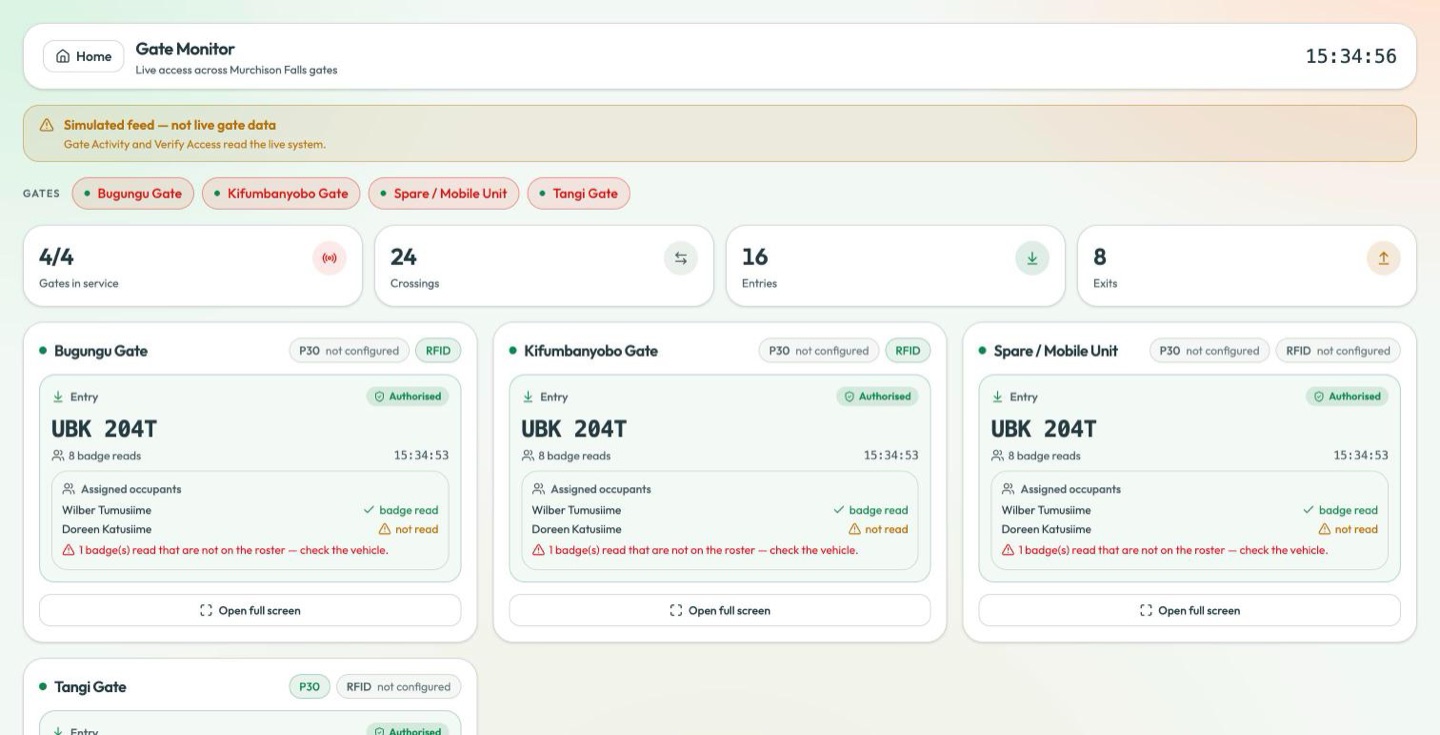
Simulated feed — not live gate data. Gate Activity and Verify Access read the live system.
The board across the top of this page is a demonstration feed. The plates, times and verdicts on it are generated, not captured. Do not make a decision at a barrier from this screen — use Verify Access for the credential in front of you and Gate Activity for what actually crossed.
A row of gate chips sits under the banner — Bugungu Gate · Kifumbanyobo Gate · Spare / Mobile Unit · Tangi Gate. Select them to narrow the board to the gates you care about; they carry the same green/red dot as the sidebar.
There are four cards, not three, for the same reason the sidebar reads 4/4: Spare / Mobile Unit is a gate registry entry, not a fourth barrier (Gates in service).
Across the top: gates in service, and today's crossings, entries and exits. Then one card per gate, each carrying:
- the gate's own status dot,
- P30 and RFID chips for its readers,
- the most recent crossing — direction, plate, the time, and whether it was Authorised or Denied,
- how many badge reads went with it,
- the assigned occupants of that vehicle,
- Open full screen.
Assigned occupants
Each card lists who is expected to be aboard the vehicle on the current crossing, and ticks them off against the badges actually read:
| Line | Meaning |
|---|---|
| ✓ badge read | That person's badge was read on this crossing. |
| ⚠ not read | They are on the roster and no badge of theirs was read. |
| ⚠ n badge(s) read that are not on the roster — check the vehicle. | More badges were read than the roster accounts for. Somebody is aboard who was not expected. |
That last line is the one worth stopping for. It does not mean the extra person is unauthorised — it means the vehicle is carrying somebody the manifest does not name, which is exactly what a gate officer should look at.
Beneath the cards, a rolling Recent activity list across all the gates.
Gates in service here is the same figure as the one in the sidebar, read from the gate registry — see Gates in service for what it does and does not tell you.
The P30 and RFID chips come from the gate-device registry, and carry a not configured state where a gate has no reader of that type. Green means a reader is registered and active, not that it is answering right now.