The home screen
A TPAS account with a gate role that an administrator has assigned to a gate (Adding a user). The app has no gate picker: it works at the gate your account is assigned to, and nowhere else.
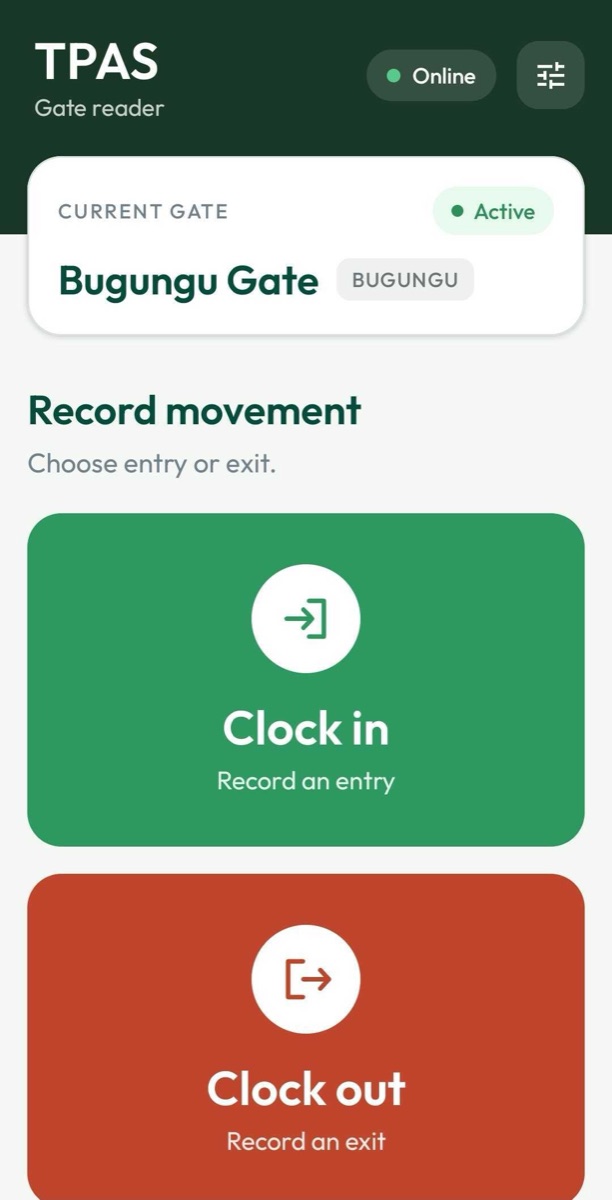
| Part | What it tells you |
|---|---|
| Online / Offline | Whether the phone has a data connection. Green Online, grey Offline. |
| Current gate | The gate every record you make is filed under, its short code, and Active. |
| Clock in — Record an entry | Start recording a vehicle and its people entering the park. |
| Clock out — Record an exit | Start recording a vehicle and its people leaving. |
The pill reads the phone's own connection. It cannot tell you whether the TPAS server is answering. What it is good for: when something fails without a message, a grey Offline tells you straight away that the problem is signal, not a refusal.
The sliders button beside the pill does nothing yet — there are no settings to change in the app.
The gate is shown here only for you to confirm. It cannot be changed from the phone — if it is the wrong gate, stop and ask an administrator to correct your account (Changing a user). Everything you record is filed against the gate shown here.